Why Your Checkout Process Is Losing Sales (and How to Fix It)
You can drive traffic, run ads, and build a great product—but if your checkout experience is broken, sales will quietly slip away. In fact, checkout is where most e-commerce revenue is either won or lost.
If your checkout process is losing sales, it’s usually not because customers changed their minds—it’s because something got in their way. The good news? Most checkout issues are fixable once you know where friction hides.
The Real Cost of a Poor Checkout Experience
When checkout feels confusing, slow, or untrustworthy, customers abandon—even when they want to buy.
Common Results of Checkout Friction
- High cart abandonment rates
- Lower conversion rates
- Lost ad spend ROI
- Reduced customer trust
- Fewer repeat purchases
Checkout optimization often delivers the fastest revenue lift of any site improvement.
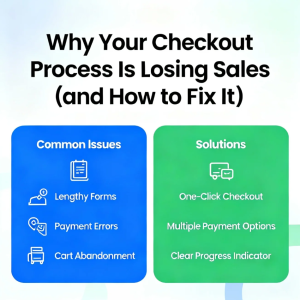
1. Too Many Steps (or Too Much Information)
Long, complicated checkouts are the #1 conversion killer.
What’s Going Wrong
- Multiple unnecessary pages
- Excessive form fields
- Forced account creation
- Asking for information you don’t actually need
How to Fix It
- Reduce checkout to as few steps as possible
- Remove non-essential fields
- Enable guest checkout
- Use autofill and address lookup
Rule of thumb: If a field doesn’t directly enable payment or delivery, question it.
2. Unexpected Costs at the Last Second
Nothing kills trust faster than surprise fees.
Common Offenders
- Shipping costs revealed late
- Hidden taxes or service fees
- Currency conversion surprises
How to Fix It
- Show full pricing early
- Offer shipping calculators on product pages
- Be transparent about taxes and fees
Customers don’t abandon because of price—they abandon because of surprise.
3. Poor Mobile Checkout Experience
In 2025, most shoppers buy on mobile. Yet many checkouts still feel desktop-only.
Mobile Checkout Issues
- Tiny buttons
- Hard-to-type forms
- Slow load times
- Pop-ups covering fields
How to Fix It
- Design mobile-first checkout
- Use large tap targets
- Enable digital wallets (Apple Pay, Google Pay)
- Minimize typing wherever possible
A smooth mobile checkout often doubles conversion rates.
4. Lack of Trust Signals
Checkout is where customers decide whether to trust you with their money.
What Undermines Trust
- No security indicators
- Unfamiliar payment methods
- Missing contact information
- Poor design or broken layouts
How to Fix It
- Display SSL/security badges
- Offer recognizable payment options
- Include clear return and refund policies
- Show customer support access
Trust doesn’t need to be shouted—it needs to be visible.
5. Limited Payment Options
Customers expect flexibility.
Why This Matters
Different shoppers prefer different payment methods:
- Credit/debit cards
- Digital wallets
- Buy Now, Pay Later
- Local payment methods
How to Fix It
- Offer multiple trusted payment options
- Prioritize region-specific methods
- Add express checkout buttons
Every missing payment option is a potential lost sale.
6. Slow Checkout Performance
Speed directly impacts conversions.
What Slows Checkout Down
- Heavy scripts
- Unoptimized images
- Third-party payment delays
- Poor server performance
How to Fix It
- Optimize checkout page speed
- Use server-side and CDN caching
- Remove unnecessary scripts
- Test checkout performance regularly
Even a one-second delay can cost real revenue.
7. No Clear Error Handling
Errors happen—but unclear ones cause frustration.
Common Problems
- Vague error messages
- Lost form data after an error
- No guidance on how to fix issues
How to Fix It
- Highlight errors clearly
- Preserve user input
- Explain exactly what needs correction
Good error handling keeps customers moving forward.
Quick Checklist: Fixing a Checkout That Loses Sales
- ✅ Fewer steps, fewer fields
- ✅ Guest checkout enabled
- ✅ Transparent pricing
- ✅ Mobile-first design
- ✅ Multiple payment options
- ✅ Visible trust signals
- ✅ Fast loading times
- ✅ Clear error messages
Each improvement compounds conversion gains.
Why Checkout Optimization Pays Off
Improving checkout doesn’t just increase sales—it:
- Improves customer satisfaction
- Boosts repeat purchases
- Increases ad efficiency
- Strengthens brand trust
Unlike traffic growth, checkout optimization works with the visitors you already have.
Conclusion
If your checkout process is losing sales, it’s not because customers don’t want your product—it’s because something is slowing them down, confusing them, or making them hesitate.
By removing friction, improving clarity, and designing for trust and speed, you turn checkout from a bottleneck into a conversion engine.
Fix checkout first. Revenue follows.







Post Comment